Liverpool Jerseys: Spreadsheet vs Google Sheets
Daniel FosterEditor-in-ChiefPublished 29 October 2026Introduction If you've already found several similar Liverpool jersey candidates in fashionreps' catalog, the hardest part usually isn't finding the items—it's organizing each candidate's crest, size, color, number options, and current link into a single set of records, then determining which details are verified and which still need to be confirmed on the page. This article solves one task: organizing the Liverpool jersey
Introduction
If you've already found several similar Liverpool jersey candidates in fashionreps' catalog, the hardest part usually isn't finding the items—it's organizing each candidate's crest, size, color, number options, and current link into a single set of records, then determining which details are verified and which still need to be confirmed on the page.
This article solves one task: organizing the Liverpool jersey candidates visible on fashionreps' website-style spreadsheet into Google Sheets, and completing a field-by-field review before ordering. It's suitable for comparing multiple similar jerseys, switching between mobile and desktop, or collaborating with others to check links. It's not meant for treating spreadsheet notes as inventory guarantees, nor for confirming crests, sizes, or seller information without opening the product detail page.
The catalog information below is recorded from the page as visible on October 22, 2026. Prices, stock, available sizes, product images, and links may change—always reopen the page to verify before actually ordering. 🧾
The Liverpool Jersey Candidate Organization Task This Article Solves
After organizing, you should be able to:
- Confirm the number of candidates, product names, and reference prices from fashionreps' Liverpool category catalog.
- Create uniform fields for each candidate to avoid mixing up different styles, colors, or bundle options.
- Verify crests, colors, sizes, and number or sock options using product detail page images and specification text.
- Mark records in Google Sheets as verified, pending verification, or stop ordering.
- Pause when links break, page information is inconsistent, or size information is insufficient, rather than filling in gaps with guesses.
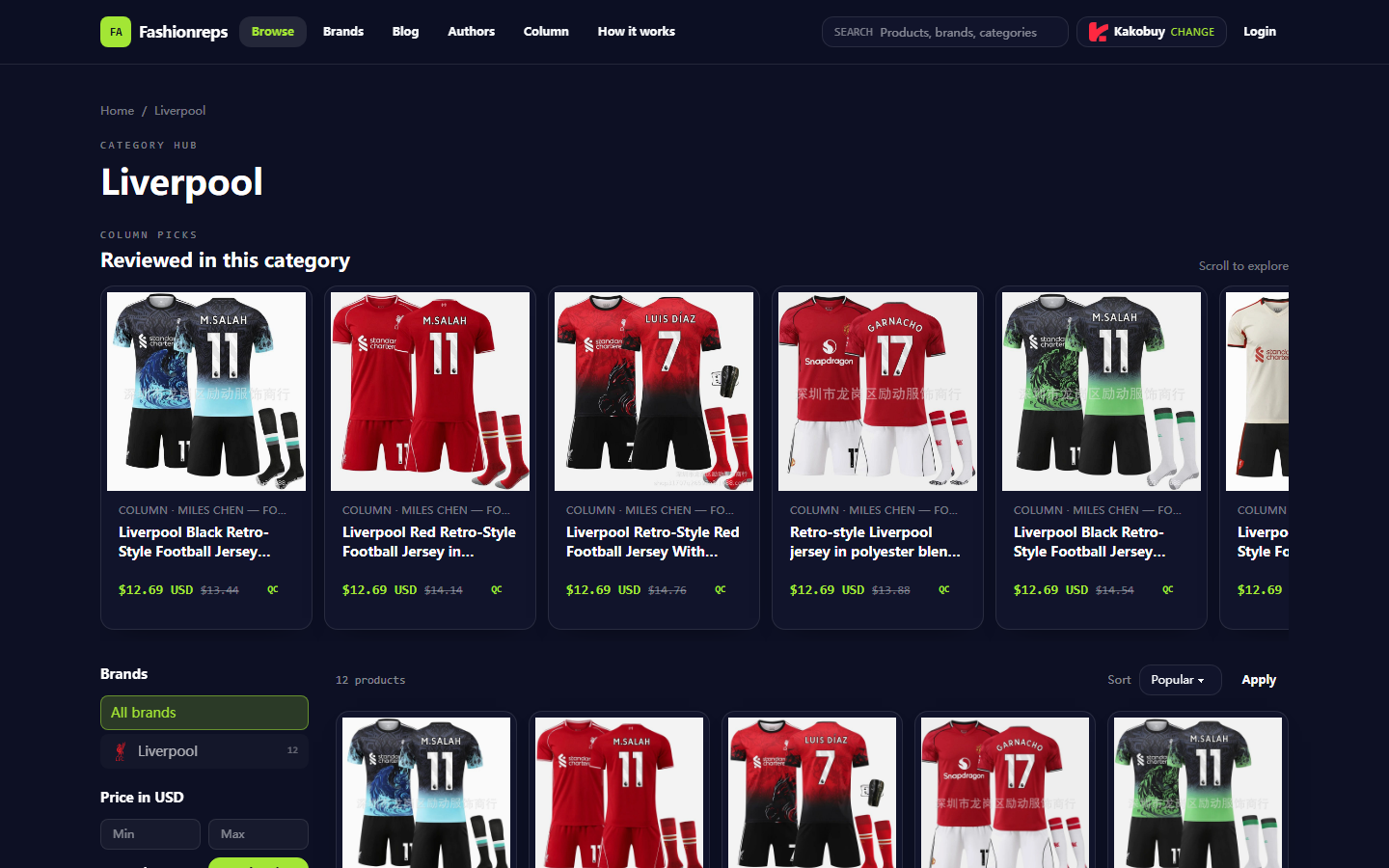
This visible catalog shows 12 Liverpool candidates, with brand filtering, dollar price filtering, and sorting options. Many product names are similar, with common differences including black, red, gray, green, or red-blue colorways; whether socks are included; whether number options are offered; and whether there is a wider youth-to-adult size range.
The reference prices in the catalog are roughly centered around $11.75, $12.69, and $15.04. These are reference prices from the catalog, not equivalent to final product price, agent purchasing fees, domestic shipping, international shipping, taxes, or after-sales costs.
First Verify the Visible Jersey Catalog and Filtering Options on fashionreps' Website-Style Spreadsheet
fashionreps' catalog is better for discovering candidates and opening product pages. The currently visible Liverpool category page includes these useful options:
- Liverpool brand or category filter.
- Minimum and maximum price filters.
- Sorting by popular, newest, price low to high, or price high to low.
- Product name, reference price, previous reference price, and QC entry.
- An option to select a purchasing agent, with the page stating that the Buy button will proceed with the selected agent.
These options solve browsing issues, not product verification. Catalog names may summarize color, material, socks, numbers, or size range, but should still be treated as candidate clues. Whether the crest actually appears in images, is positioned correctly, and whether complete sizes are listed, must be judged on the product detail page.
When creating the initial candidate list from the catalog, don't just save the cheapest few. First record all styles with obvious differences, then filter with uniform fields. This reduces the chance of missing candidates with different colors, bundles, or size ranges due to similar names.
The differences among visible catalog candidates can be understood this way:
| Visible difference in catalog | What still needs confirmation | What not to infer directly |
|---|---|---|
| Black, red, gray, green, or red-blue colorway | Actual main color, secondary color, and crest position in detail page images | Don't assume color is exactly as in title |
| Wording like socks, numbers, or bundle | Whether bundle is selectable, affects price, has corresponding sizes | Don't treat "bundles" as default included |
| Polyester blend or similar material description | Whether detail page has specific material ratio and care instructions | Cannot judge feel or breathability from this |
| Youth-to-adult or wide size range | Specific size chart, garment length, chest, and measurement units | Don't assume "wide size run" fits all body types |
| QC entry | Whether page provides visible inspection materials for current candidate | Don't treat QC tag as quality guarantee |
The catalog page is good for first-round filtering, but not for independently completing final confirmation of crest, size, and link. 📋
Set Up Style, Crest, Size, Color, and Link Fields in Google Sheets
The role of Google Sheets is to bring scattered information from multiple product pages into one filterable, collaborative record sheet. It's recommended to put only one product candidate per row; don't write multiple colors, numbers, or sizes of one jersey into a single long note.
Suggested fields:
| Field | How to fill | Verification standard |
|---|---|---|
| Candidate ID | Use a fixed ID, e.g., LFC-01 | Each candidate unique, not duplicated due to sorting changes |
| Catalog name | Record visible product name verbatim | Don't rewrite as official style name |
| Color | Record catalog color, then add detail page confirmation | Mark conflict when image and text disagree |
| Crest visibility | Record visible, not visible, or needs zoom | Only based on current page images or descriptions |
| Crest position & detail | Record left chest, embroidered, printed, or not stated | Fill "not stated" if no evidence |
| Material | Record visible description verbatim | Don't add ratio if not given |
| Size range | Record sizes actually listed on page | Keep original units and size system |
| Measured dimensions | Record garment length, chest, etc. as shown | Leave blank if no data; don't estimate |
| Number or sock options | Distinguish default included, selectable, and not stated | Don't treat plural in title as included |
| Reference price | Record currency and date | Don't confuse with final settlement price |
| Product page status | Accessible, redirect, 404, empty, or pending review | Broken page must not be marked as orderable |
| Current link | Paste page URL | Must reopen to check it still points to same candidate |
| Verification status | Pending, partially verified, verified, stop | Mark verified only if conditions met |
| Notes | Record conflicts, doubts, and review date | Don't write unverifiable subjective judgments |
If collaborating with multiple people, set "verification status," "color," "crest visibility," and "product page status" as dropdown options. This reduces missed filters due to synonyms, like mixing "pending confirmation," "not checked," and "pending verification" into three statuses.
Freeze the first row, and turn on filters. When filtering, first check risky records by "stop" or "partially verified," then narrow candidates by color, size range, or bundle options. Collaborators should note the date and reason for modifications in the notes, not directly overwrite key evidence.
Compare Page Images, Specs, and Current Link Field by Field for the Same Candidate
Use the same order for each candidate to reduce omissions. Don't start with the color you care most about, then fill other fields from memory.
Step 1: Confirm the Link Still Points to the Same Product
Open the link saved in Google Sheets, and check:
- Does the page load normally?
- Does the page title still correspond to the Liverpool jersey candidate?
- Does the page redirect to a category page, search page, or another product?
- Do product images match the catalog color and style?
- Is the buy button or agent entry still present?
If the link redirects to a category page, don't treat the category page as the original product detail page. If the page shows 404, blank content, a completely different product, or only tags without product info, mark as stop and record the review date.
Step 2: Confirm Crest Information
Crest verification requires at least three answers:
- Is the crest clearly visible in the image?
- Where is the crest located on the jersey?
- Does the page text specify embroidery, printing, or other technique?
If image resolution is insufficient, or the crest is folded, obscured, or cropped, don't write "correct," "authentic," or "high quality." You can write "needs clearer image to confirm." Descriptions like "Liverpool-style" don't automatically prove crest details match official jerseys.
When a crest exists, still distinguish between "page shows crest" and "product meets official licensing or authenticity standards." The former can be recorded as a page fact; the latter requires independent licensing or source evidence and cannot be inferred from images.
Step 3: Confirm Size
First record the sizing system used on the page, then record specific values. Key checks:
- Are both youth and adult sizes listed?
- Are numeric and letter sizes mixed?
- Are measurement items like chest and length complete?
- Is the unit centimeters, inches, or not stated?
- Is the page's recommended size separate from actual measurements?
If there is no size chart, the table should say "page does not provide size chart," not guess based on common jersey sizes. If the page only says "16–3XL" or "youth-to-adult," that only indicates a claimed wide range, not a substitute for specific measurements.
Before ordering, compare your own clothing or body measurements item by item with the product table. If the page only has vague S, M, L without chest or length, and return conditions are unclear, mark the candidate as "partially verified" or "stop." 📏
Step 4: Confirm Color and Bundle Options
Colors in the title should be checked against the main image color. For descriptions like red, red-blue, gray, or green, also confirm whether images show obvious secondary colors, stripes, or paneling.
For options like socks, numbers, and fillers, distinguish three states:
- Page explicitly states default included.
- Page states selectable, but needs configuration at order time.
- Page only appears in title or image, with no explanation on detail page.
The third case cannot be counted directly into total configuration. In Google Sheets, set separate "page description" and "confirmed configuration" fields to avoid treating promotional titles as order content.
Compare Website Catalog Browsing and Spreadsheet Filtering on Mobile and Desktop
fashionreps' website catalog and Google Sheets solve different problems. The website is better for discovering and opening candidates; the spreadsheet is better for structured comparison across multiple candidates.
On mobile, the website catalog is usually better for quickly browsing images, opening product pages, and checking current links. Google Sheets is better for viewing a few key fields; when there are too many fields, horizontal scrolling easily hides color, size, or status columns. For mobile review, prioritize keeping candidate ID, color, size status, crest status, link status, and stop reason.
On desktop, Google Sheets is better for filtering multiple fields simultaneously, e.g., first filter red candidates, then filter records with size charts, and finally view rows with accessible link status. The website catalog is better for opening pages one by one after filtering for evidence confirmation.
Don't treat the website page and Google Sheets as two interchangeable catalogs. A safer workflow: website discovers candidates, product page verifies facts, Google Sheets saves structured results, return to product page for pre-order review. This avoids old spreadsheet notes overwriting new page information.
Distinguish Page Facts, Spreadsheet Notes, and Unverified Community Leads
When organizing, separate information into three layers:
Page facts are content directly visible on the current product page, such as product name, images, visible colors, listed sizes, reference price, and link status.
Spreadsheet notes are your or collaborators' organization of page facts, e.g., "image shows red main body," "size chart missing length," "link accessible on 2026-10-22." Notes must be traceable back to the original page for review.
Community leads are claims from discussions, comments, or other users' shares. They can suggest directions to check, but cannot automatically be upgraded to product facts. In particular, don't write single community statements about size running large, crest quality, seller reliability, or logistics experience as definitive conclusions.
If a community discussion wasn't fully read, record as partially read; don't claim to have completely understood the entire discussion. For current price, stock, link, and size, prioritize the current product page and record the verification date. 🔍
Review and Stop Conditions When Link, Size, or Crest Information Is Inconsistent
In the following situations, pause ordering and set status to "stop" or "pending review":
- Catalog name clearly inconsistent with product detail page title.
- Current link redirects to category, search, 404 pages, or another product.
- Image color conflicts with text description, and page doesn't explain.
- Crest cannot be clearly identified, or image and text descriptions of crest technique differ.
- Page lacks sufficient size data to compare with your own measurements.
- Number, socks, or other bundle options appear only in images without text or configuration explanation.
- Reference price differs from current page price without recording change date and applicable conditions.
- Page requires selecting configuration in an external agent, and current spreadsheet doesn't save corresponding selection.
When reviewing, don't delete old records directly. Keep the original candidate ID, and note the problem found, the date of reopening, and evidence needed. If a new link confirms the same product, you can update the current link and keep the old link record; if you cannot confirm it's the same product, create a new candidate row.
Only when the link is accessible, product identity is consistent, crest information has visible basis, size data is sufficient for comparison, color and bundle options are distinguished, and price and verification date are clear, can you mark as "verified." "Verified" only means page data has been checked; it does not guarantee stock, quality, licensing, logistics, or after-sales.
Pre-Order Action Checklist for Liverpool Jerseys After Organizing
Before ordering, review in this order:
- Reconfirm the candidate still exists on the fashionreps category page.
- Open the current product link; confirm no redirect, breakage, or change to another product.
- Do a final comparison of page color and images.
- Zoom in on images to check if crest is visible, and note what the page doesn't specify.
- Compare your own measurements with the product size chart; don't substitute your usual letter size.
- Confirm whether numbers, socks, and other bundles are default included or need separate selection.
- Record current reference price, currency, and verification date.
- Understand purchasing agent, domestic shipping, international shipping, taxes, customs documents, and return conditions; don't treat catalog reference price as total cost.
- Save the final selected candidate ID and link to avoid misselecting among similar products.
If you choose combined shipping, first calculate the added parcel value, volumetric weight, single loss risk, and possible route restrictions; if separate shipping, calculate extra fixed fees and repeated shipping costs. Combined shipping isn't always cheaper, and separate shipping isn't always safer—compare based on actual items, destination country, and logistics quotes. Don't reduce costs through undervaluing, splitting orders to evade taxes, or evading inspections.
The final recommendation: use the website catalog as a discovery and browsing entry, use Google Sheets as a verification record and collaboration tool, and use the product detail page as the primary source of current facts. For any candidate with unexplained conflicts in crest, size, or link, pause ordering until sufficient clear page evidence is obtained. ✅
Article Image

About Daniel Foster
Kakobuy and Yupoo agent workflows, replica-apparel quality control, and cross-border shipping logistics.
Daniel Foster is Editor-in-Chief of Kakobuy Yupoo Review, overseeing all reviews and maintaining the testing standards. Coverage includes Kakobuy and Yupoo agent workflows, replica-apparel quality control and cross-border shipping, with both garment use and agent response included in reviews. Daniel wears every apparel item for at least three days before scoring and photographs all tags, stitching and hardware. Agent response times are recorded to the minute, allowing the article to describe both the physical checks and the waiting time within the service process.