How to Fix Kenzo Color & Size Mismatch on fashionreps
Daniel FosterEditor-in-ChiefPublished 15 October 2026Introduction When the color, size, image, or purchase link for the same Kenzo item on fashionreps shows inconsistencies, do not continue placing an order based solely on the title or a single image. This article addresses one specific problem: how to verify item variant information step by step, and pause when evidence is insufficient. After completing these checks, you should be able to determine whether it's a page display difference, a variant selection issue, or incomplete item data. This ar
Introduction
When the color, size, image, or purchase link for the same Kenzo item on fashionreps shows inconsistencies, do not continue placing an order based solely on the title or a single image. This article addresses one specific problem: how to verify item variant information step by step, and pause when evidence is insufficient. After completing these checks, you should be able to determine whether it's a page display difference, a variant selection issue, or incomplete item data.
This article is based on visible page information, verified on October 14, 2026. The reference prices, stock, size availability, and external agent information shown on the page may change and should not be treated as a current order commitment.
The Specific Problem This Kenzo Item Check Aims to Solve
You need to verify four sets of information on the same product page:
- Whether the product title and product image refer to the same style.
- Whether the color name matches the main image and detail images.
- Whether the size options are consistent with the size range in the description or images.
- Whether the purchase button or agent link on the page still corresponds to the current item.
If only the text and images have minor differences, do not immediately conclude it's a product error; if the color options, size options, and images each point to different styles, treat it as an unresolved product data issue.

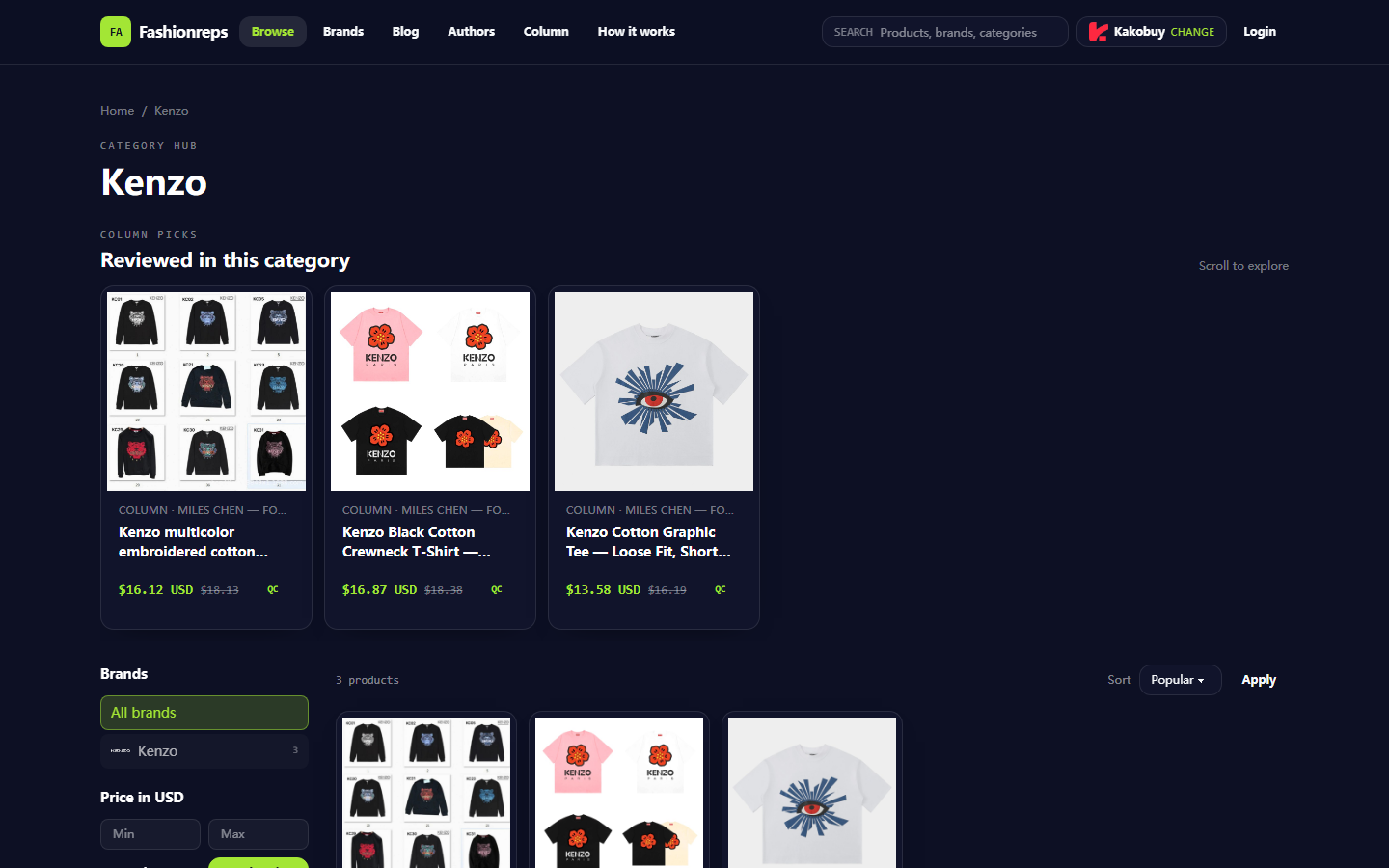
Figure: Visible item entry and filter information in the fashionreps Kenzo category page.
Entering the Same Product Page from the fashionreps Directory
First, select the target item from the Kenzo category page, then enter the product details page. Do not open multiple similar items at once and rely on browser tab order, because the category page may contain several Kenzo T-shirts with similar names.
After entering, record the following:
- The complete product title.
- The displayed reference price and currency.
- The color or style options visible on the page.
- The size options visible on the page.
- The number and order of main images, variant images, and detail images.
- The external shopping agent link corresponding to the current purchase button.
fashionreps' page states its purpose is to help users discover products and enter external shopping agents; orders, payment, and logistics are handled by the agent's website. Therefore, information on fashionreps can only serve as a basis for discovery and comparison, not a substitute for final variant confirmation on the agent's order page.
Recording Visible Differences in Color, Size, Images, and Links
It is recommended to use a simple record, filling in each item, rather than saving only a screenshot. Screenshots can preserve visual evidence, but written records are easier for comparing changes before and after page refresh.
| Check Item | What to Record on Page | Meaning When Inconsistent |
|---|---|---|
| Color | Option name, selected state, corresponding image | Color label may not be updated, image may not switch with variant, or data missing |
| Size | All size options, selectable or not, whether size chart is shown | Category page description may differ from detail page options |
| Image | Correspondence between main image, variant images, and color | There may be generic images, mismatched images, or image order cache |
| Entry | Purchase button, agent name, and product identifier after redirect | Entry may not be updated or different items share the same entry |
When recording, use the original text from the page; do not write your own speculation as fact. For example, if the page only shows "Black", record it as "Black"; do not expand it to specific fabric, print version, or seasonal style.
Distinguishing Page Cache, Variant Selection, and Missing Product Data
You can troubleshoot in the following order to avoid repeated refreshes without new evidence.
Step 1: Reload the current product page and confirm that the title, color, and size are still consistent. If the information becomes consistent after refresh, it may be incomplete page loading or temporary cache, but you should still save the differences before and after refresh.
Step 2: Click each visible color option one by one. Observe whether the image changes, whether the selected state moves, and whether the size list updates synchronously. If the color name changes but the image does not, you cannot confirm that the image belongs to the new color.
Step 3: Check each size option. Confirm whether the size is merely text or can actually be selected. If the page states a certain size range but the actual options lack part of it, rely on the actual selectable options and record the discrepancy between description and options.
Step 4: Check whether the product title changes after switching variants. If the title, image, and color options each display different information, the page data cannot independently support an order decision.
Step 5: Reopen the product entry and compare the product name, color, and size fields before and after the redirect. If the page after redirect is provided by an external agent, use the variant fields that can be confirmed on its order page as the final check, but do not submit an order when information is incomplete.
Common judgment methods are as follows:
- Only the first load is abnormal, and after refresh all fields are consistent: you can continue observing, but keep records.
- After changing color, the image changes synchronously, and size options are stable: more like normal variant selection.
- After changing color, the image does not change, or size ranges contradict each other in different places: insufficient information, pause ordering.
- Category page, detail page, and external entry each correspond to different product names: do not combine them into one product.
Using a Second Page Entry to Re-verify Current Information
The purpose of a second entry is to verify whether the information can be reproduced, not to find a page that better matches expectations.
You can re-enter the same product from the category page, or close and reopen the same detail page. On both occasions, record the title, color, size, and purchase entry. If the two entries show the same information, the page data is relatively more stable; if different entries cause changes in product name, image, or variant options, keep the differences and do not choose one version as the "correct answer".
When re-verifying, note the following:
- Do not treat a change in the page address in the browser address bar as a change in product variant.
- Do not infer that color or size has changed based on price changes.
- Do not treat the default color on the agent's page as the color you want to buy.
- Do not treat the size range on the category page as actual stock on the external order page.
If the page provides filters, also confirm that filters only change the product list, not the current product's variants. Filter results and product detail page fields need to be recorded separately.
How to Pause Ordering and Save Records When Evidence Is Insufficient
Pause ordering if any of the following occurs:
- Color name, image, and selected state cannot be matched.
- Detail page does not clearly list sizes, or size description conflicts with actual options.
- Second entry shows a different product title, and the difference cannot be explained.
- After redirecting from the purchase entry, the product, color, or size cannot be confirmed.
- The page only provides generic images, and cannot prove the image corresponds to the current variant.
- You need to guess to select color, size, or style.
When saving records, include at least: page title, verification date, fields with discrepancies, page screenshots, results after re-entering, and whether you have redirected to an external agent. Screenshots should cover order numbers, account information, payment information, and other personal data; do not publicly share complete orders, passports, payment cards, or shipping labels.
The goal of this step is not to prove that the page is definitely faulty, but to confirm whether existing evidence is sufficient to support the next action. When evidence is insufficient, pausing is itself a reasonable outcome. 🧾
What Fields to Submit When Contacting Official Support
If differences persist after reloading and second-entry verification, submit minimal necessary information through the official support or platform contact channels clearly provided on the page. Do not send account passwords, payment cards, passports, or complete shipping details in public comments or unknown private messages.
Recommended submission includes:
- Product page title.
- Visible product URL or page identifier.
- Original displayed text of the color field.
- Original displayed text of the size field.
- Specific locations where images mismatch color or size.
- Verification times for the first and second entries.
- Whether you have already redirected to an external shopping agent.
- Whether you have not yet submitted an order or payment.
When describing the problem, use verifiable statements, such as "After selecting Black, the main image did not change" or "The page description shows S–XL, but the current options do not display all sizes." Do not write "This is definitely fake" or "The platform will definitely send the wrong item," because page discrepancies alone cannot prove product authenticity or fulfillment results.
Checklist to Continue Browsing or Stop After Troubleshooting
Conditions to continue browsing:
- Color options, images, and selected state can be matched.
- Size options are clear, and there are no critical differences conflicting with the page description.
- Second entry repeatedly shows the same product and variant information.
- External agent page can re-confirm the target color and size.
Conditions to stop:
- The target variant still cannot be confirmed.
- Page information changes continuously between different entries.
- You need to rely on images to guess color or size.
- The external order page cannot confirm product fields.
- Support channel has not clarified the difference, but the page already requests payment.
This troubleshooting will not lower the product price, nor guarantee stock, quality, or after-sales results. Its value lies in reducing subsequent communication, returns, and time costs caused by selecting the wrong color or size. If the difference is unexplained, it is suitable for buyers who value verifiable records and are willing to wait for confirmation; not suitable for those who must order immediately, cannot accept variant uncertainty, or need the platform to guarantee product attributes. ✅
About Daniel Foster
Kakobuy and Yupoo agent workflows, replica-apparel quality control, and cross-border shipping logistics.
Daniel Foster is Editor-in-Chief of Kakobuy Yupoo Review, overseeing all reviews and maintaining the testing standards. Coverage includes Kakobuy and Yupoo agent workflows, replica-apparel quality control and cross-border shipping, with both garment use and agent response included in reviews. Daniel wears every apparel item for at least three days before scoring and photographs all tags, stitching and hardware. Agent response times are recorded to the minute, allowing the article to describe both the physical checks and the waiting time within the service process.