How to Check JBL Portable Speaker QC Photos
Daniel FosterEditor-in-ChiefPublished 5 November 2026First Confirm Which Product the QC Photos Belong To When checking JBL portable speaker QC photos, the first step is not to look at the appearance directly, but to confirm that the photos belong to the exact product you are about to pay for. This checkable record comes from the product QC page on fashion-reps. The page record shows the product is JBL Xtreme Portable Speaker, SKU is SPU-EOZ8JP9JUU, and the page variant is labeled Navy. However, in the same
First Confirm Which Product the QC Photos Belong To
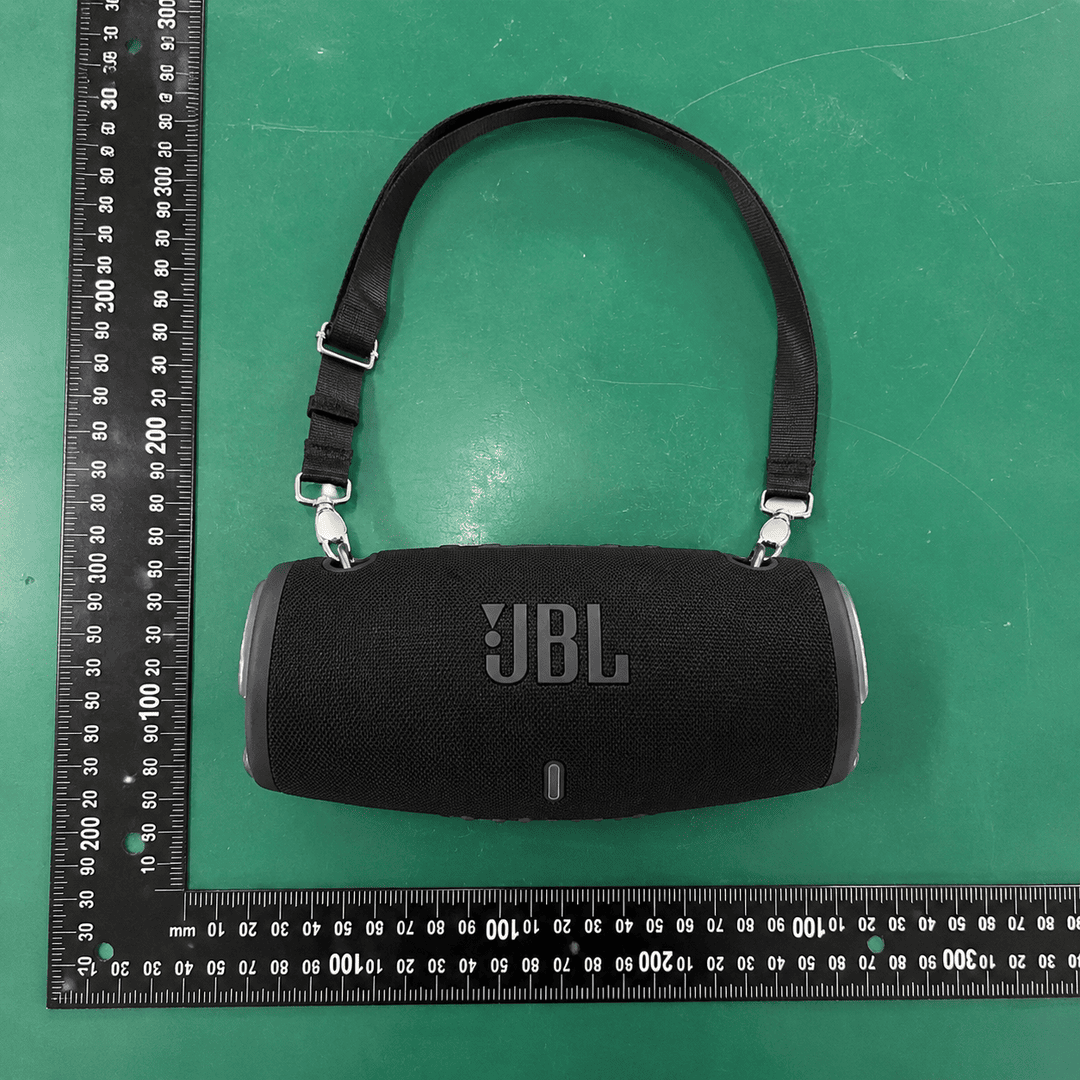
When checking JBL portable speaker QC photos, the first step is not to look at the appearance directly, but to confirm that the photos belong to the exact product you are about to pay for. This checkable record comes from the product QC page on fashion-reps. The page record shows the product is JBL Xtreme Portable Speaker, SKU is SPU-EOZ8JP9JUU, and the page variant is labeled Navy.
However, in the same product summary, there are descriptions such as "JBL Gray Portable Speaker" along with IPX7, 20W, Bluetooth 5.2, and four driver units. When color names are inconsistent, you cannot judge which product the photos correspond to based on the title alone. You need to cross-check using the variant, SKU, and the actual color in the QC photos from the product detail page.

This image is QC evidence material for the product, but the image itself can only be used to observe the appearance visible in the photo. It cannot be used to guarantee authenticity, sound quality, battery life, or waterproof performance.
Check the QC Photos in This Order
1. First Compare Model, Color, and Variant
From the product detail page, enter the section labeled View QC Photos, and then view the QC image gallery for that product. Do not start judging from images on brand pages, category pages, or other JBL products.
Record the following key information:
- Is the product name still JBL Xtreme Portable Speaker?
- Is the SKU SPU-EOZ8JP9JUU?
- Does the color in your order match the page record?
- Is the color of the speaker in the QC photos closer to Navy, Gray, or another variant?
- Do the photos show the same speaker, rather than different products from different angles?
If you ordered Navy but the QC photos show Gray overall, pause payment or shipment confirmation and ask the agent to explain whether the color difference is due to lighting, batch variation, or a variant mistake. Do not simply explain the color inconsistency as a photography artifact.
2. Check the Shell and Overall Size Impression
QC photos can help you observe whether the shell has obvious bumps, scratches, dents, unglued areas, deformation, or loose mesh. When looking at the front, back, top, and side views, confirm that these photos are of the same speaker, and look for discontinuous gaps along the shell edges.
Photos can support judgments about "whether a visible flaw exists," but they cannot accurately prove actual size. Without a ruler, reference object, or product specification evidence, do not estimate length, width, and height from photos, and do not use them to confirm whether the speaker fits your storage space.
3. Check the Button Layout One by One
Look at the button area on the top or side, and record the number of buttons actually visible in the photos, their arrangement, icons, and surface condition. Focus on:
- Are any buttons missing, crooked, or visibly sunken?
- Are the icons blurry, misaligned, or peeling?
- Are there obvious scratches or dents around the buttons?
- Are there abnormal gaps between the button caps and the shell?
Photos can only prove the appearance of the buttons at the time of shooting. They cannot prove that each button triggers properly, nor can they confirm Bluetooth pairing, volume control, or playback functions.
4. Check the Charging Port and Other Connectors
Ask for clear close-up photos of the port area. When checking, see if the port opening is deformed, if the edges are damaged, if there is obvious foreign material inside, and if the port cover or protective structure is intact.
If the photos only show distant views and you cannot see the port type, quantity, or internal condition, mark this item as insufficient evidence. Do not assume this specific product has a certain port based on common JBL series designs, and do not equate a normal port appearance with normal charging or connection functions.
5. Check the Battery Compartment and Bottom Structure
If this speaker model has a visible battery compartment, bottom cover, or service area, ask for corresponding close-up photos. Observe whether the cover is closed, whether screws or fasteners are missing, whether there are prying marks on the edges, and whether the sealing structure has obvious damage.
If the QC gallery has no photos of the battery compartment or bottom structure, record it as "not shown," and do not infer the internal battery condition. Photos also cannot confirm battery capacity, health, cycle count, actual battery life, or swelling risk. Information like 20W, IPX7, Bluetooth 5.2, and four driver units in the product summary are page descriptions, not hardware evidence that can be verified solely from QC photos.
Visible Evidence and Items That Cannot Be Confirmed from Photos
| Check Item | What QC Photos Can Help Judge | What Photos Alone Cannot Confirm |
|---|---|---|
| Color | The color of the body under current lighting; whether it clearly differs from your order | Official color code, batch differences, or true color reproduction |
| Shell | Visible issues like scratches, dents, deformation, unglued areas | Internal structure, material strength, and long-term durability |
| Buttons | Arrangement, icons, missing parts, and surface damage | Whether buttons trigger properly and whether functions are complete |
| Ports | Appearance, whether quantity is clearly visible in photos, and obvious damage | Whether charging, data, or audio connections work properly |
| Battery compartment | Appearance of cover, fasteners, and visible sealing structure | Battery capacity, battery life, health, and safety status |
| Waterproof ability | Whether there is obvious damage or sealing structure abnormality | Whether IPX7 or other waterproof rating is met |
When to Request Additional Photos or Pause Payment
If any of the following situations occur, it is not advisable to proceed with payment or shipment confirmation based solely on existing QC photos:
- SKU, color, or order variant does not match the QC page record
- Photos do not show key areas such as the back, ports, bottom, or battery compartment
- Colors, shell details, or labels in the same set of photos seem to belong to different speakers
- Port and button areas are too far away, too reflective, or unrecognizable
- Page descriptions clearly conflict with the appearance observable in the photos
- Photos only prove appearance, but are used to claim battery life, sound quality, waterproofing, or functionality
You can make specific photo requests to the agent: provide full front, back, top button, port close-up, bottom, and battery compartment photos, and have them also photograph the product label or SKU identification. If after additional photos the color or model still cannot be confirmed, pause the order, get a clear explanation, and then decide whether to continue.
Final Judgment Before Payment
The core of QC checking for this product is to confirm three things: whether the photos belong to the JBL Xtreme Portable Speaker corresponding to SKU SPU-EOZ8JP9JUU, whether the body color matches the selected variant, and whether the buttons, ports, battery compartment, and shell provide sufficiently clear direct evidence.
Currently, the color descriptions of Navy and Gray are inconsistent, so color cannot be directly considered confirmed. For battery capacity, battery life, waterproof performance, sound quality, actual size, and functional status, conclusions cannot be drawn solely from existing QC photos. If key angles are missing, the safest approach is to request additional photos; if the model or color still cannot be matched, pause payment or shipment confirmation.
About Daniel Foster
Kakobuy and Yupoo agent workflows, replica-apparel quality control, and cross-border shipping logistics.
Daniel Foster is Editor-in-Chief of Kakobuy Yupoo Review, overseeing all reviews and maintaining the testing standards. Coverage includes Kakobuy and Yupoo agent workflows, replica-apparel quality control and cross-border shipping, with both garment use and agent response included in reviews. Daniel wears every apparel item for at least three days before scoring and photographs all tags, stitching and hardware. Agent response times are recorded to the minute, allowing the article to describe both the physical checks and the waiting time within the service process.