Filter fashionreps JBL Headphones on Mobile: Save Search
Daniel FosterEditor-in-ChiefPublished 31 October 2026If you search for fashionreps JBL products on mobile, the easiest place to go wrong isn't the keywords themselves, but mixing up different models when returning to the product list, opening image pages, and re-confirming links. A safer approach: first narrow down with consistent keywords, then check the product title an

If you search for fashionreps JBL products on mobile, the easiest place to go wrong isn't the keywords themselves, but mixing up different models when returning to the product list, opening image pages, and re-confirming links. A safer approach: first narrow down with consistent keywords, then check the product title and SKU, and finally save the product link together with the filter conditions.
First confirm what the page displays
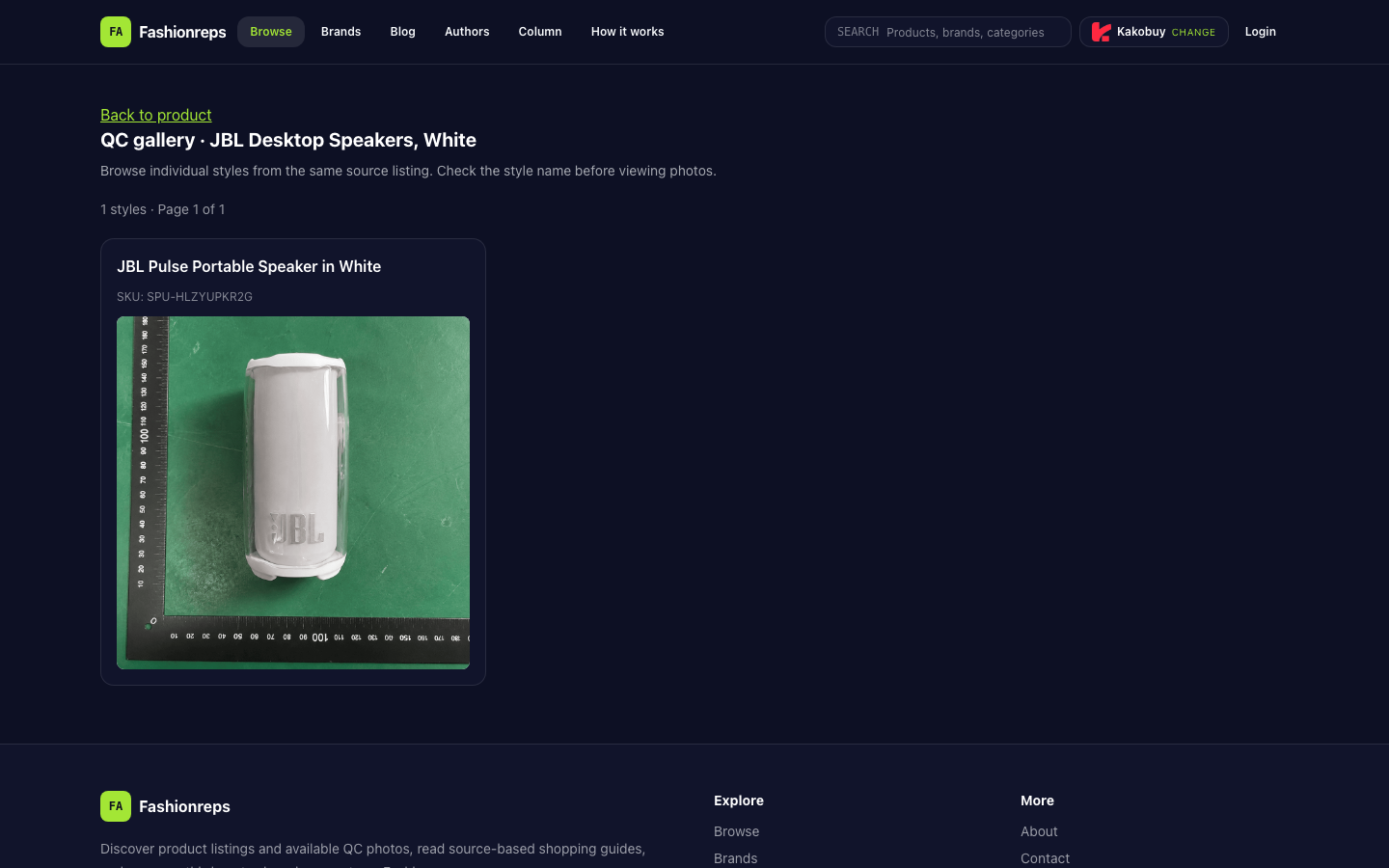
The page verified this time is the fashionreps JBL product QC page. The page shows a search entry, brand browsing, product image viewing, and a path back to products; the QC page title is "JBL Desktop Speakers, White", the page lists 1 style, with the specific name "JBL Pulse Portable Speaker in White", and SKU "SPU-HLZYUPKR2G".
This shows that the current page evidence corresponds to a white JBL portable speaker, not a confirmed headphone model. Therefore, even if JBL appears in search results, you cannot record it as headphones based solely on the brand name or appearance in the image. If your target is headphones, continue to check the product title, model, and page link; if the page has no clear model, pause the order.
Actual sequence for mobile filtering
1. Use brand words first, then add category words
The first round can use jbl to observe the number of results and product naming. The second round adds words like headphones, earbuds, or specific models. The purpose is to first confirm whether the site actually has the corresponding category, then narrow to the target product.
Do not treat jbl search results directly as a headphone list. In the current verified page, the JBL result corresponds to a portable speaker, which just shows that brand search may mix in other product types.
2. Look at the title first after opening the product page
After entering the product page, read the product title first, then look at the image. At least record the following:
- Product title
- Category, such as headphones, earbuds, or speaker
- Color or version
- SKU shown on the page
- Full path to the product detail page or QC page
- Recording time
The name shown on this page is "JBL Pulse Portable Speaker in White", so it can only be recorded as a white JBL portable speaker, not rewritten as JBL headphones.
3. Keep the return path when viewing images
After viewing QC images on mobile, prioritize using the return to product or return to product list entry on the page, and do not continuously use the browser back button. Browser back may bring you back to the image page, the previous filter result, or an earlier search page.
After returning to the product page, check again whether the title and SKU match what you just recorded. If the title, image, and SKU don't match, don't save it as a candidate product yet.
4. Save a reviewable link
The product link should be stored in the same record with the search term and page title. If you only save the image address, later you often can't tell which product the image belongs to; only saving the title may lead to picking the wrong model when returning to search results.
Recommended fields:
- Search term: e.g.,
jbl headphones - Page title
- Category judgment: headphones, earbuds, speaker, or pending confirmation
- Color or version
- SKU
- Product link
- Image page link, if any
- Latest verification date
- Notes: whether title and image match, whether returning still points to the same product
How to divide work between the website page and Google Sheets
A website-based directory is good for discovering products and reviewing original pages, while Google Sheets is better for putting multiple search results together for filtering and adding judgment fields temporarily missing from the page. The two are not replacements for each other but take on discovery and organizing tasks respectively.
| Task | fashionreps page | Google Sheets record |
|---|---|---|
| Discover candidate products | Use on-site search, brand entrance, and product pages | Not suitable as an original product discovery entry |
| Check title, image, and SKU | View product page or QC page | Save verification results for later review |
| Handle multiple keywords | Open results one by one and confirm pages | Filter by search term, category, and status |
| Avoid choosing wrong after returning | Rely on product page, QC page, and return path for rechecking | Save complete link, SKU, and verification time |
| Handle uncertain products | Go back to the page for further checking | Mark as "pending confirmation", not directly as a buyable recommendation |
In the table, "category judgment" should use four states: "headphones", "earbuds", "speaker", and "pending confirmation". This avoids mixing products with the same brand but different categories.
A record template suitable for mobile review
You can first create a minimal record:
jbl headphones|pending confirmation|title to check|SKU to check|product link|2026-10-31|image and return path to recheck
After confirming the page, change "pending confirmation" to the specific category, and fill in the title, SKU, and color. If the page only shows a speaker name like "JBL Pulse Portable Speaker in White", keep it as a speaker record, not change it to headphones to match the search term.
Pause conditions before ordering
If any of the following occurs, it is recommended to stop and continue:
- The search term is headphones, but the product title clearly says speaker
- Product title and image category inconsistent
- After returning, the page jumps to a different product or different SKU
- Only image visible, cannot confirm product title or link
- Product page cannot open properly, or link jump result inconsistent with record
This verifiable information only confirms a white JBL portable speaker QC page and its SKU on fashionreps, and cannot prove the existence of purchasable JBL headphones, nor infer price, stock, shipping, or product features. The focus of mobile filtering is to bind save search terms, product title, SKU, and link; when evidence is insufficient, mark the record as pending confirmation, which is more reliable than ordering directly.
About Daniel Foster
Kakobuy and Yupoo agent workflows, replica-apparel quality control, and cross-border shipping logistics.
Daniel Foster is Editor-in-Chief of Kakobuy Yupoo Review, overseeing all reviews and maintaining the testing standards. Coverage includes Kakobuy and Yupoo agent workflows, replica-apparel quality control and cross-border shipping, with both garment use and agent response included in reviews. Daniel wears every apparel item for at least three days before scoring and photographs all tags, stitching and hardware. Agent response times are recorded to the minute, allowing the article to describe both the physical checks and the waiting time within the service process.