England Jersey Image-Title Mismatch: Reviewable Record Guide
Daniel FosterEditor-in-ChiefPublished 1 November 2026First, Separate "Possible Same Item" from "Page-Confirmed" When processing england jersey images, the most common mistake is seeing similar colors or badges and directly assigning the image to a title. A safer approach is to build a candidate record: first save the existing page information, then separately record whether the image matches the title, style, and variant, and finally decide to retain, pending review, or exclude. Fashion-reps' england c
First, Separate "Possible Same Item" from "Page-Confirmed"
When processing england jersey images, the most common mistake is seeing similar colors or badges and directly assigning the image to a title. A safer approach is to build a candidate record: first save the existing page information, then separately record whether the image matches the title, style, and variant, and finally decide to retain, pending review, or exclude.
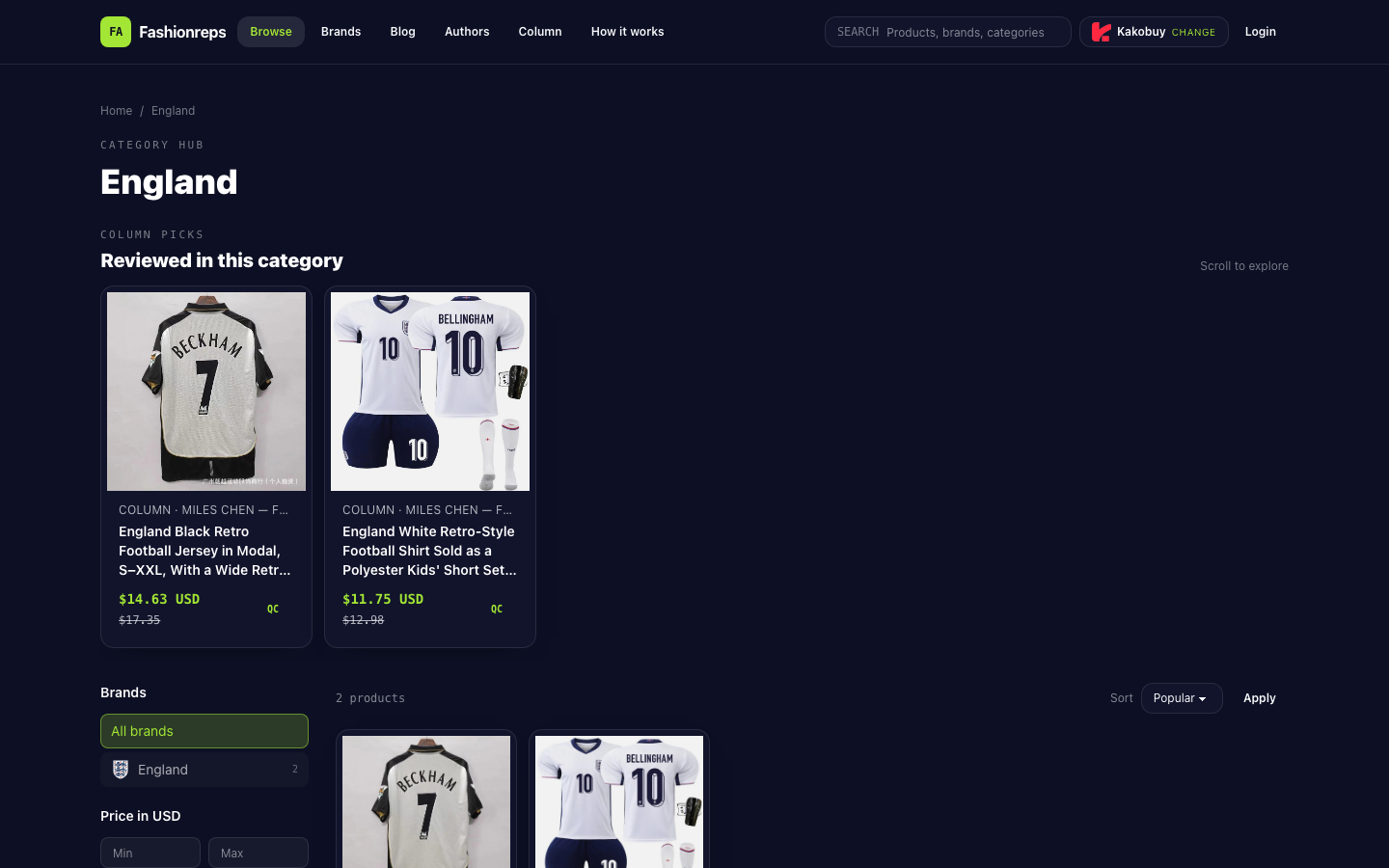
Fashion-reps' england category page currently shows 2 product cards: one is a black retro football jersey with the page title mentioning Modal material, S–XXL sizes, and multiple retro variants, with a reference price of $14.63; the other is a white retro-style football uniform, described as a polyester children's short set, with sock and shin guard options, and a reference price of $11.75. The page also shows previous reference prices, but this information alone cannot prove the specific variant in the image.

Phase One: Save Page Evidence First
Create only one main record per candidate; do not guess the product name from the image. At minimum, save the following fields:
- Original product card title
- Team, style, or category displayed on the page
- Color displayed on the page
- Material, size, or set composition displayed on the page
- Product card image
- Product link
- Page verification time
- Reference price displayed at the time
- Whether there are QC tags or other page prompts
Prices should be labeled as "page reference price"; do not rewrite them as final cost. When the page does not clearly state stock, shipping, or actual purchasability, do not add these conclusions to the candidate record.
Phase Two: Establish Image Correspondence
Image judgment should be divided into three levels:
| Status | Meaning | Next Action |
|---|---|---|
| Page confirmed same item | Detail page title, variant information, and image correspond to each other | Can enter candidate queue; retain detail page evidence |
| Image suspected same item | Image color, cut, or badge similar, but lacks detail page confirmation | Retain as pending; do not treat as matched product |
| Exclude | Image clearly conflicts with title, color, category, or set type | Record exclusion reason; do not merge with other products |
"Image suspected same item" is not a low-confidence confirmed result but an intermediate state requiring further verification. This avoids merging the black retro jersey with the white children's short set and prevents creating incorrect product relationships based solely on similar colors.
Phase Three: Handle Title-Image Mismatch
When a mismatch is found, review in the following order:
- Reopen the corresponding product detail page to confirm whether the image belongs to the current product and not an adjacent card on the category page.
- Compare colors, materials, adult or children positioning, set composition, and size range in the title.
- Check whether the image shows a different variant; if the page does not clearly explain the relationship between variant and image, retain as pending.
- Record the specific conflict, e.g., "Title shows white children's short set, image suspected single adult jersey"; do not write just "image mismatch".
- If unable to rule out page image misplacement, outdated image, or variant mixing, stop specific assertions and retain the original candidate record.
Do not assume the image belongs to the same jersey just because the product name contains England. Team name is only a search clue and cannot replace image, variant, and detail page evidence.
Use Website Directory for Evidence, Google Sheets for Queue Management
Fashion-reps' category page is suitable for discovering candidates: you can browse product cards from the England category entry, view titles, images, price prompts, and QC tags, then enter the detail page for further verification. It acts more as a reader-facing product catalog, focusing on navigating from page to specific product.
Google Sheets is suitable for organizing fields, filtering status, and handing over tasks as the number of candidates increases. It cannot replace product detail pages, nor can it automatically prove similar images as the same item. The actual division of work can be as follows:
| Task | Website Directory or Detail Page | Google Sheets |
|---|---|---|
| Discover candidates | Browse category page, product cards, images | Record candidate ID |
| Verify product | View title, variants, detail page evidence | Fill in verification results and missing fields |
| Manage duplicates | Return to original page to judge if same product | Filter by title, link, and status |
| Hand off review | Provide original page as basis | Mark responsible person, review date, and next step |
Links in the table should point only to actual corresponding product pages. Do not mistake category page links, image paths, or search results for confirmed product detail links.
Recommended Candidate Record Structure
You can set the following fields for each record:
- candidate_id: Candidate number
- page_title: Original page title
- teamorstyle: Team or style
- color: Color shown on page
- materialorset: Material or set information
- size: Size shown on page
- image_status: Confirmed, suspected, undetermined, or excluded
- titleimagerelation: Consistent, partially consistent, or conflict
- source_link: Corresponding page link
- pagecheckedat: Page verification time
- price_note: Page reference price and its description
- missing_fields: Fields still missing
- exclusion_reason: Reason for exclusion
- review_due: Next review date
missingfields and exclusionreason should not be left blank. Even if temporarily unconfirmable, specify whether the missing fields are detail page variants, image source, size correspondence, or page status information.
When to Retain and When to Exclude
Situations suitable for retaining as pending records include:
- Image and title colors are similar, but the detail page does not clearly explain the specific variant.
- Product card information is complete, but the image cannot confirm whether it is a single item or part of a set.
- Title mentions multiple options, but the page does not state which option the current image corresponds to.
- The product is visible on the category page, but the detail page or purchase status has not been fully verified.
Situations suitable for exclusion include:
- Title clearly states children's set, but image shows an unidentifiable adult single jersey.
- Title shows white, but image mainly black, and the page has no variant explanation.
- The product category in the image is completely different from the title, e.g., jersey image corresponds to a shin guard or accessory title.
- Link is broken, page cannot open, and there is no other reliable evidence to confirm product identity.
Exclusion does not mean deletion. Keeping exclusion reasons prevents the same erroneous candidate from being added to the queue during later reviews.
Final Checklist
Before submitting a candidate record, check item by item:
- Did you save the original page title, not a rewritten name?
- Did you distinguish reference price from final purchase cost?
- Did you clearly mark the evidence level for image correspondence?
- Did you record missing fields and specific conflicts?
- Did you separate category page discovery from detail page confirmation?
- Did you avoid using similar colors, team names, or badges as the sole basis for matching?
- Did you set a review date for pending records?
- Did you retain exclusion records instead of silently deleting them?
What you build is not a seemingly complete list of England jerseys, but a candidate queue that can trace back to the original page, explain the judgment basis, and support subsequent handoffs.
About Daniel Foster
Kakobuy and Yupoo agent workflows, replica-apparel quality control, and cross-border shipping logistics.
Daniel Foster is Editor-in-Chief of Kakobuy Yupoo Review, overseeing all reviews and maintaining the testing standards. Coverage includes Kakobuy and Yupoo agent workflows, replica-apparel quality control and cross-border shipping, with both garment use and agent response included in reviews. Daniel wears every apparel item for at least three days before scoring and photographs all tags, stitching and hardware. Agent response times are recorded to the minute, allowing the article to describe both the physical checks and the waiting time within the service process.